만들고자 하는 앱 화면
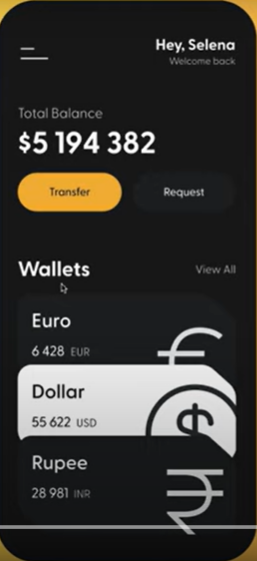
* 안드로이드 스튜디오 정보보기 단축키 커서를 둔 다음 Ctrl+Q
* 프로젝트 빠른 수정 (전구 - padding, widget,...으로 씌울때 ) 단축키 Alt+ Enter
* 코드 블록 선택 Ctrl+ W 두번
# Header
수직으로 쌓는 위젯 Column - 하나의 child가 아닌 children을 가짐
- MainAxisAlignment 수직방향정렬
- CrossAxisAlignment 수평방향정렬
수평으로 쌓는 위젯 Row - 하나의 child가 아닌 children을 가짐
- MainAxisAlignment 수평방향 정렬
--오른쪽 끝으로 옮길때 mainAxisAlignment: MainAxisAlignment.end
- CrossAxisAlignment 수직방향정렬
Color
- Colors.black
- Color.fromARGB(255,79,7,7) // 첫번째 value는 항상 255
- Color() // 0xFF다음에 숫자 6개
- Color.fromRGBO(,,,) // 마지막 숫자는 opacity
SizedBox
일정한 공간을 주고 싶을 때
Padding
- 양 옆 맨 위 맨아래에 일정한 너비만큼 띄우고 싶을 때
- Padding(
padding: EdgeInsets.symmetric(vertical: ,horizontal: ),
child: 패딩 넣고자 하는 요소
)
* EdgeInsets.all, EdgeInsets.only 등등
* 맨 끝에 , 콤마 넣는 거 잊지말기
* flutter 에서 자동 주석을 넣어줌
import 'package:flutter/material.dart';

void main() {
  runApp(App());
}

class App extends StatelessWidget{   // 앱의 root임 두가지 옵션중 하나를 return해야함 1. material 앱(구글)2 cupertino(애플)
  @override
  Widget build(BuildContext context) {
    return MaterialApp(
      home: Scaffold(
        backgroundColor: Color(0xFF181818),
        body: Padding(
          padding: EdgeInsets.symmetric(
            horizontal: 40,
          ),    // EdgeInsets.symmetric
          child: Column(
            children: [
              SizedBox(
                height: 50,
              ),   // SizedBox
              Row(
                mainAxisAlignment: MainAxisAlignment.end,
                children: [
                  Column(
                    crossAxisAlignment: CrossAxisAlignment.end,
                    children: [
                      Text('Hey Selena',
                        style: TextStyle(
                          color: Colors.white,
                          fontSize: 28,
                          fontWeight: FontWeight.w800,
                        ),  //  TextStyle
                      ),   // Text
                      Text('Welcome back',
                        style: TextStyle(
                          color: Colors.white.withOpacity(0.8),
                          fontSize: 18,
                        ),   // TextStyle
                      ), // Text
                    ],
                  ), // 수직  // Column
                ],
              ) //수평  //Row
            ],
          ), //Column은 하나의 child만 가지지 않고 children이라는 List를 가짐  //Column
        ) //Padding
      ), //Scaffold
    ); //material app의 property중 하나인 home  // MaterialApp
  }
}
# Developer Tools
오른쪽에 Flutter Inspector 활용 -App이 어떻게 구성되어 있는지를 보여줌- 다른 옵션을 미리보기 할 수 있음.
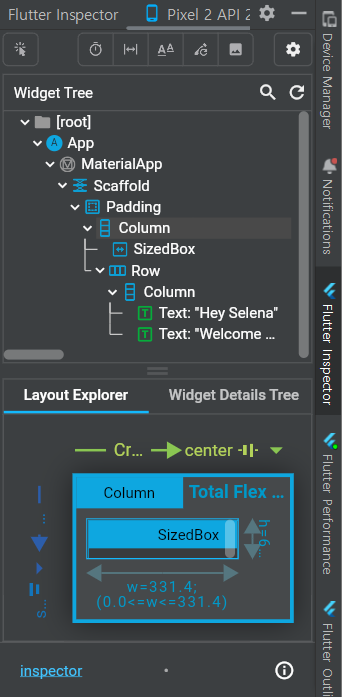
Select Widget Mode로 device로 영역을 볼 수 있다
# 버튼 Buttons Section
Container Widget
html에 div와도 같은 것, child를 가지고 있는 단순한 box
Button은 중복 되므로 위젯으로 만들기
button.dart 파일 만들어서 - 코드 작성
import 'package:flutter/material.dart';

class Button extends StatelessWidget {
  final String text;
  final Color bgColor;
  final Color textColor;

  Button({
    super.key,
    required this.text,
    required this.bgColor,
    required this.textColor,
  });

  @override
  Widget build(BuildContext context) {
    return Container(
      decoration: BoxDecoration(
        color: bgColor,
        borderRadius: BorderRadius.circular(45),
      ),
      child: Padding(
        padding: EdgeInsets.symmetric(
          vertical: 17,
          horizontal: 50,
        ),
        child: Text(
          text,
          style: TextStyle(
            color: textColor,
            fontSize: 18,
          ),
        ),
      ),
    );
  }


}
main.dart에는 Button(배경색, 글자색, 글자) 만 하면 됨
Row(
  mainAxisAlignment: MainAxisAlignment.spaceBetween,
  children: [
    Button(
      text: 'Transfer',
      bgColor: Color(0xFFF1B33B),
      textColor: Colors.black,
    ),
    Button(
      text: 'Request',
      bgColor: Colors.grey.shade900,
      textColor: Colors.white70,
    ),
  ],
)
# Prefer const with constant constructors 에러 - const를 붙여 상수로 만들어 달라는 의미
해결 방법 : <Flutter>Prefer const wit.. : 네이버블로그 (naver.com)
<Flutter>Prefer const with constant constructors 상수 경고 해결
이와 같이 플러터 코드에 'Prefer const with constant constructors.'라는 경고 문구가 뜰 때...
blog.naver.com
# Cards
Container(
  clipBehavior: Clip.hardEdge, // 넘어간 부분 처리
  decoration: BoxDecoration(
    color: Color(0xFF1F2123),
    borderRadius: BorderRadius.circular(20),
  ),
  child: Padding(
    padding: const EdgeInsets.all(30),
    child: Row(
      mainAxisAlignment: MainAxisAlignment.spaceBetween,
      children: [
        Column(
          crossAxisAlignment: CrossAxisAlignment.start,
          children: [
            Text(
              'Euro',
              style: TextStyle(
                color: Colors.white,
                fontSize: 32,
                fontWeight: FontWeight.w600,
              ),
            ),
            SizedBox(
              height: 10,
            ),
            Row(
              children: [
                Text(
                  '6 428',
                  style: TextStyle(
                    color: Colors.white,
                    fontSize: 20,
                  ),
                ),
                SizedBox(
                  width: 10,
                ),
                Text(
                  'EUR',
                  style: TextStyle(
                    color: Colors.white.withOpacity(0.8),
                    fontSize: 15,
                  ),
                ),
              ],
            ),
          ],
        ),
        Transform.scale(
            scale: 2.2,
            child: Transform.translate(
              offset: Offset(8,15),
              child: Icon(
                Icons.euro_rounded,
                color: Colors.white,
                size: 88,
              ),
            )) //icon
      ],
    ),
  ),
),
아이콘이 카드를 넘어가게 하고 싶을 때 => padding, margin만으로는 안됨, 카드 크기 자체도 변함
Transform.scale로 아이콘 크기 변하게 하고
Transform.translate(offset:Offset(,))으로 아이콘 위치를 바꿈 카드를 넘어가게
넘어간 부분 처리 => 맨 위에 Container(clipBehavior: Clip.hardEdge) // 넘어간 부분 삭제
# Scroll 스크롤
body: SingleChildScrollView 위젯으로 전체를 감싸주면 스크롤이 됨
'Flutter' 카테고리의 다른 글
| Pomodoro app 클론 코딩 (0) | 2023.02.20 |
|---|---|
| Stateful Widget (0) | 2023.02.18 |
| Flutter main.dart structure 구조 (0) | 2023.02.12 |